
Executive summary
Live TV is a policy problem disguised as a video problem
Viewers expect television. Browsers expect user gestures, muted autoplay, and strict cross-origin rules. Mobile OSes suspend iframes on lock and cheerfully redraw YouTube's native chrome on wake.
This project ships a single black 16:9 frame, a labeled Ativar som button, and infrastructure so boring an operator only configures OBS once. The engineering depth lives beneath intentional silence — that is the cognitive distance collapse.
My role and brief
End-to-End Ownership: OBS Config to Mobile Wake Handler
I owned the live-video product end to end: product strategy, UX state model, Next.js viewer, health API, hls.js integration, YouTube fallback behavior, mobile wake handling, nginx-rtmp VM setup, TLS, OBS settings, operator page, and runbook. The assignment was not “embed a video.” It was to make a small broadcaster feel operationally credible with almost no recurring infrastructure cost.
The audience never asked for RTMP, HLS, MSE, native Safari playback, stale segment detection, iframe postMessage, or autoplay policy. They asked for television. The product challenge was to preserve that simple mental model while acknowledging every browser constraint underneath.
Viewer promise
A black 16:9 frame, no site chrome, no YouTube controls, and one clear action when sound requires consent.
Operator promise
OBS configuration should be stable enough that volunteers do not need to understand the server.
Infrastructure promise
Oracle Always Free VM with nginx + certbot only; no hidden bridge process required for video.
Product promise
If live is not actually fresh, fail into intentional fallback content instead of freezing or lying.
Plain language primer
HLS Primer: Why HTTP Segments Beat WebRTC at $0
HLS (HTTP Live Streaming) splits video into small files — typically one second each — and serves a playlist (.m3u8) that tells the player which file to fetch next. Your browser downloads segments over ordinary HTTPS, buffers a few seconds, and plays.
Why not WebRTC? WebRTC is lower latency but needs specialized media servers and billing. For a $0 Oracle VM and volunteer operators, HLS via nginx-rtmp is the right trade-off: ~3–6 seconds behind live, infinitely maintainable.
Decision log
Architecture by Subtraction: Four Components I Deleted
The final architecture is small because earlier versions were deliberately pruned. Senior product engineering is often the discipline of deleting plausible solutions that make operations worse.
Video.js → removed
It solved a generic player problem, not this product problem. The project needed a chromeless TV frame, not controls. hls.js + native Safari HLS gave better control over failure states.
Node/ffmpeg bridge → removed
Video already has OBS as the encoder. Adding a bridge duplicated responsibility, increased VM memory pressure, and created another process to restart.
Manifest-only health → rejected
A playlist can exist long after the studio stopped publishing. The product needed freshness semantics, not existence semantics.
Full-screen invisible unmute → rejected
It maximized tap area but weakened intent. The shipped “Ativar som” button makes browser policy visible and keeps the action deliberate.
Architecture
OBS → RTMP → nginx → Vercel viewer
FIG 1 — OBS sends RTMP once. nginx slices HLS on disk. The viewer never exposes infrastructure — only the black frame.
Off-air branch uses the same health API as the operator panel so green means green for everyone.
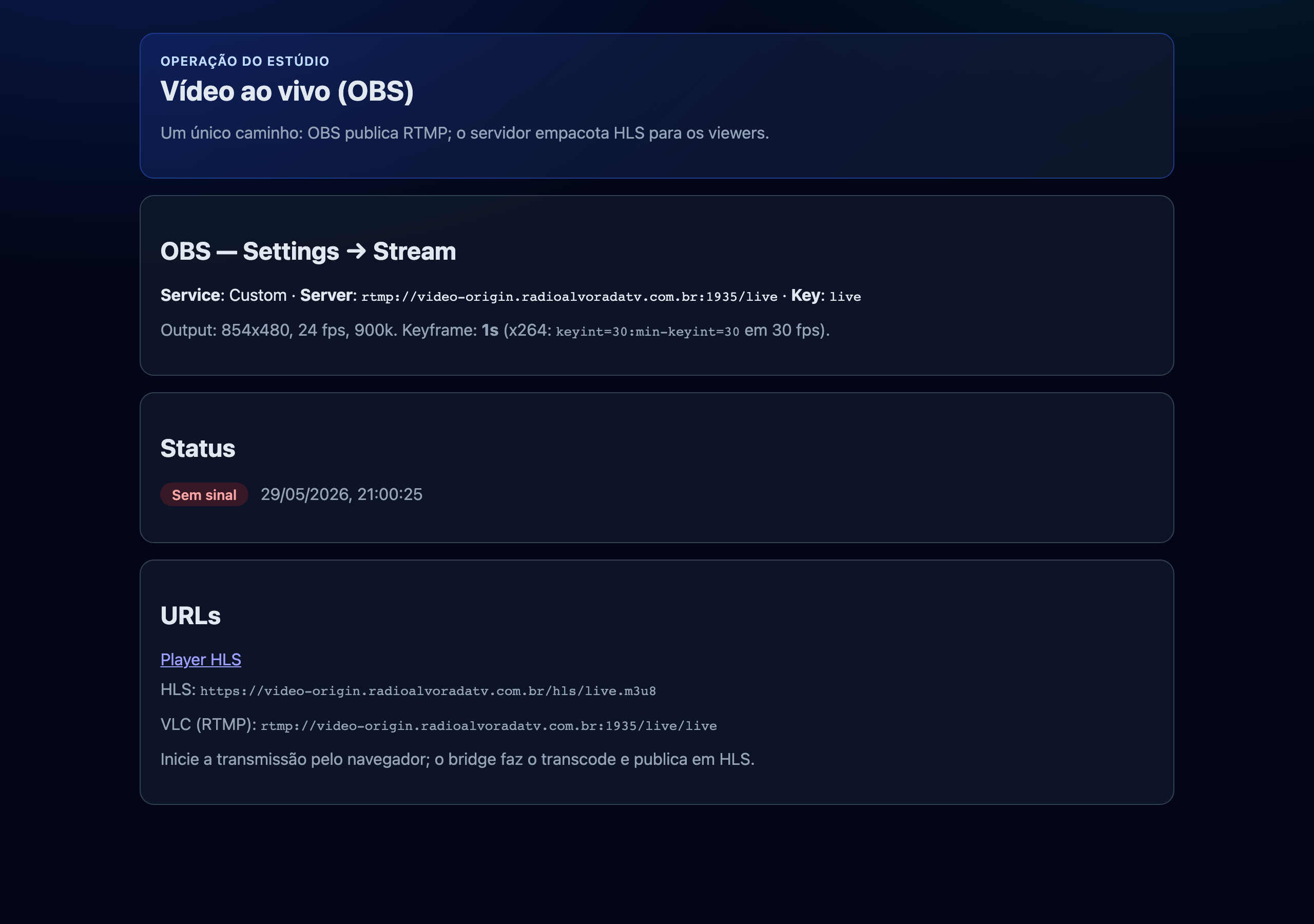
Operator panel mirrors the runbook — RTMP URL, keyframe interval, and the same health semantics as the viewer.
OBS (Mac, x264, keyframe = 1s)
  rtmp://video-origin…:1935/live  (stream key: live)
    → nginx-rtmp module
        hls_fragment 1s
        hls_playlist_length 2s
        writes /var/www/hls/live.m3u8 + live-N.ts
    → HTTPS + CORS on video-origin…/hls/

Vercel Next.js (video.radioalvoradatv.com.br)
  GET /api/health → hasFreshLiveHls()
  Viewer:
    if Hls.isSupported() → hls.js MSE pipeline
    else → <video src="live.m3u8"> (Safari native)
Off-air → cropped YouTube iframe + IFrame API postMessageTechnical deep dive
Killing the 80-Second False-Live Bug with Segment Freshness
Early health logic asked: “Does live.m3u8 exist?” After OBS stopped, old .ts files remained listed. Health stayed green. Viewers stared at a frozen picture for ~80 seconds.
FIG 2 — Live is a time-based truth. A playlist file on disk is not proof anyone is broadcasting.
Five-step hasFreshLiveHls() reduced off-air detection from ~80s to ~15–25s with hysteresis polling.
hasFreshLiveHls() — step by step
- Fetch the manifest with cache busting
- Reject if missing
#EXTM3Uor if#EXT-X-ENDLIST(VOD end) - Parse the last
.tsfilename from the playlist - HEAD request that segment URL — read
Last-Modified - Live only if segment age < 8 seconds
In plain terms: “Live” means a segment was written in the last eight seconds — not that a playlist file exists on disk. Off-air → YouTube now lands in ~15–25s with hysteresis polling (2 consecutive OK to enter live, 2–3 failures to leave).
Playback
Dual Playback: hls.js MSE and Safari Native HLS
Chrome, Brave, Firefox
hls.js demuxes HLS in JavaScript and feeds Media Source Extensions. Config tuned for live: low latency mode, 2-segment sync target, capped buffer (12s max). Fatal errors recover network/media once; only then fall back through health polling.
Safari (and iOS)
Native HLS on <video src="live.m3u8"> — no hls.js weight. Brave was incorrectly treated as Safari early on; fixed by gating on Hls.isSupported() instead of user-agent sniffing.
Mode switching
Hysteresis Model: Cautious Entry, Patient Exit
The viewer does not switch modes on a single request. It uses a small hysteresis model: two positive health checks before entering live, and two to three failures before leaving live depending on whether playback had already started. This avoids flapping when the origin or mobile network hiccups.
In plain language: the product is slightly cautious when claiming “we are live,” and slightly patient before interrupting a live viewer. That patience is a UX decision implemented as counters and polling intervals.
YouTube fallback
Chromeless YouTube Fallback: CSS Crop and postMessage Control
Off-air plays a looped YouTube VOD (not a live stream ID — loop=1 on live IDs shows “recording not available”). Embed params strip chrome: controls=0, modestbranding=1, iv_load_policy=3, enablejsapi=1, mute=1.
CSS scales the iframe 1.48× centered — cropping title bar and logo inside the same 16:9 box as live HLS. Unmute uses IFrame API postMessage (unMute, setVolume, playVideo) — never iframe src changes, which caused reload flashes.
Temporal UI
The black mask is a product feature, not a loading hack
YouTube's embed parameters can reduce chrome, but they cannot guarantee that the center play glyph, title bar, or post-lock native controls never flash. The black mask is the visual contract: the user should either see the station frame or an intentional loading state, never raw platform UI.
Initial fallback load keeps the mask for at least six seconds and waits for YouTube to report playing or buffering. Screen unlock re-applies a shorter mask, sends playVideo and mutecommands repeatedly, and then reveals the frame only after the player is active or the maximum wait is reached.
Mobile UX
Mobile Lifecycle: Lock, Wake, Remute, Reveal
FIG 3 — Each mobile state has designed timing: 6s initial mask, labeled unmute, 3s resume mask with remute.
visibilitychange, freeze/resume, and pageshow are layered because iOS Safari is inconsistent alone.
Black mask + spinner
Initial YouTube load: minimum 6s cover before reveal — kills center play glyph flash. Resume after lock: 3s minimum (8s max) with spinner while playVideo + mute postMessages retry at 150ms, 400ms, 900ms, 1.5s.
Ativar som pill
Live: show after playing while muted. YouTube: show after mask clears. Hidden during resume cover. After unlock, both paths remute — wake is a new consent moment (autoplay policy + user expectation).
Wake listeners
visibilitychange, Page Lifecycle freeze/resume, and bfcache pageshow — layered because iOS Safari is inconsistent with any single event.
Rejected paths
Rejected Paths and Complexity Budget
Node/ffmpeg bridge on VM — removed. Video path stays OBS → nginx only (audio accepts a bridge; different operator UX).
Full-screen invisible unmute — accidental taps and iframe reload bugs. Labeled lower-center pill won.
Playlist < 2s — tested fragility; buffer stalls beat marginal latency gains.
Outcome
Production Results and Engineering Depth
This is the featured case study because it shows the full range of work: product strategy, interaction design, browser policy research, frontend state management, streaming infrastructure, deployment, and operational documentation. It is also honest about the trade-off: HLS is not the lowest-latency technology possible, but it is the best fit for a $0, volunteer-operated broadcast stack.
If you're hiring for a remote Design Engineer, Frontend Developer, Full Stack Developer, or Product Engineer role, this page shows how I handle real-world constraints: browser policy, mobile lifecycle, infrastructure trade-offs, and clear UX.
- Live TV on Oracle Always Free — nginx + certbot only on origin
- Stale segment false-live eliminated
- Mobile YouTube chrome after unlock — auto-covered without user tap
- Operator runbook + single setup script + /operator panel sharing health semantics
- Iterative production refinements to health checks, hysteresis, and mobile lifecycle handling
FAQ